Our ERP is working. Our team is creating invoices, generating reports, managing orders, and getting the daily work done.
So, why upgrade?
This is a common question businesses ask when their Frappe or ERPNext version is still running without any major problems. And honestly, if everything appears to be working, an upgrade can easily feel like something that can wait.
But there is a catch.
As your ERP version gets older, the technology surrounding it keeps advancing. Security updates change, integrations evolve, newer features become available, and fixing an issue on an older version can take more effort than it used to.
What looks like a perfectly fine ERP today can slowly become harder and more expensive to maintain.
That is why a Frappe or ERPNext version upgrade is not just an IT task. Done at the right time, it can help your business improve security, performance, and usability and prepare the system for what comes next.
What Is a Frappe & ERPNext Version Upgrade?
Simply put, a version upgrade means moving your existing Frappe or ERPNext system from an older release to a newer supported version, for example, moving from Version 13 to Version 15 or from Version 14 to Version 16.
But it isn’t just about changing the version number.
Newer releases can bring improvements such as:
- Better security
- Performance improvements
- New business features
- Improved user experience
- Better reporting
- Updated technology support
- Bug fixes and stability improvements
- Better compatibility with third-party integrations
Think of it like upgrading your smartphone. Your old phone may still work perfectly well, but that doesn’t mean it can keep up with everything a newer phone can do.
The same applies to your ERP.
Why Is Upgrading Important?
Your ERP sits at the center of your business operations. As the business changes, the system needs to keep up.
Here are some of the practical reasons why businesses should not keep postponing upgrades.
1. Continued Support from the Frappe Ecosystem
Every ERPNext version has a support lifecycle. As newer versions are released, older versions eventually reach End of Life (EOL).
Once a version is no longer actively supported, you may no longer receive:
- Security updates
- Bug fixes
- Compatibility improvements
- The same level of community and ecosystem support
This doesn’t necessarily mean your ERP will stop working overnight.
It means that if something goes wrong, getting it fixed may become more difficult than it would be on a supported version.
2. Faster Issue Resolution
Here’s something teams often notice after staying on an older version for too long: simple issues can take longer to solve.
Why?
Because developers and support teams are generally working with newer versions. Existing solutions, documentation, community discussions, and fixes are increasingly focused on supported releases.
That can turn a small problem into a search for workarounds.
Instead of fixing the actual business problem, your team may end up spending time figuring out how to make an older version behave the way you need it to.
3. Keeping Pace With Business Growth
Your business doesn’t stay the same.
You add users.
> You process more transactions.
> You open new departments or locations.
> You connect new applications.
> You automate more processes.
Your ERP needs to grow with you.
A version that was perfectly adequate when your business was smaller may not be the best foundation for your next stage of growth.
4. Getting More From Your ERP Investment
You invested in ERPNext to improve the way your business works not simply to maintain an accounting or operations system.
Newer versions introduce capabilities that can help you automate more, improve visibility, and simplify everyday processes.
Before investing in another external tool to solve a business requirement, it is worth checking whether the capability is already available or better supported in a newer ERPNext version.
What Happens If You Don’t Upgrade?
The biggest misconception is that an outdated ERP immediately becomes a problem.
Usually, it doesn’t.
The problem builds gradually.
A few workarounds here. An integration issue there. More developer effort for a small change. A report that takes longer to run.
Eventually, these small issues start adding up.
1. Rising Maintenance Costs
Older systems often require more attention to keep running smoothly.
You may find your team dealing with:
- More troubleshooting
- Custom workarounds
- Compatibility problems
- Greater dependency on developers
- Increasing support effort
At some point, maintaining the old version can cost more than planning a proper upgrade.
2. Reduced System Performance
As your business data grows, your ERP has more work to handle.
You may start noticing things like:
- Slow reports
- Delayed document loading
- Longer processing times
- Higher server resource usage
A few seconds may not sound like much.
But multiply those seconds across hundreds of users and thousands of transactions, and the productivity impact becomes very real.
3. Integration Limitations
Your ERP rarely works alone anymore.
Businesses connect ERPNext with payment gateways, e-commerce platforms, CRM systems, HR applications, government portals, and increasingly, AI-powered tools.
Older versions may not work smoothly with newer integration standards.
That can make it harder to connect the tools your business wants to use next.
4. More Difficult Future Upgrades
This is one of the biggest reasons not to keep postponing an upgrade.
The longer you wait, the more versions you may have to move through and the more customizations you may have accumulated.
Regular upgrades generally mean smaller changes, easier testing, lower risk, and better control over the project.
In simple terms: don’t wait until your ERP becomes a problem before deciding to upgrade it.
Not sure if your ERPNext version is due for an upgrade?
Before waiting for performance issues or compatibility problems to appear, get your current setup reviewed. Our ERPNext experts can help you assess your version, customisations, integrations, and upgrade requirements.
Talk to an ERPNext Expert!
Key Benefits of Upgrading Frappe & ERPNext
- Stronger Security and Business Protection
Your ERP contains financial information, customer data, employee records, inventory details, and other business-critical information.
Keeping the system current helps your business take advantage of newer security improvements, vulnerability fixes, authentication mechanisms, and access controls.
An upgrade isn’t only about protecting the software. It’s about reducing unnecessary risk to the business.
- Improved User Experience and Employee Productivity
Your employees use ERPNext every day.
If they have to deal with slow screens, outdated interfaces, or unnecessary steps, those small frustrations become part of their working day.
Newer versions can offer improvements in navigation, usability, accessibility, mobile experience, and workflows.
The goal is simple: let people spend less time fighting with the system and more time getting their actual work done.
- Access to New Features and Continuous Innovation
Business requirements change.
The process that worked two years ago may now need more automation, better reporting, or fewer manual approvals.
Newer ERPNext releases continue to introduce improvements across areas such as:
- Workflow automation
- Reporting and analytics
- Document management
- Approvals and collaboration
- Accounting
- HR
- CRM
- Business operations
Staying current means your business can take advantage of these improvements instead of being limited by an older version.
- Better Performance and Faster Operations
Nobody likes waiting for an ERP report to load.
Even small performance improvements can make a noticeable difference when hundreds of employees use the system throughout the day.
Depending on the version and configuration, an upgrade can bring improvements in:
- Report generation
- Search
- Document loading
- Background jobs
- Server resource utilization
A faster system means less waiting and smoother day-to-day operations.
- Scalability for Future Business Growth
The ERP that works for your business today should not become the reason you hesitate to grow tomorrow.
As you add users, transactions, locations, integrations, and business processes, your ERP needs to handle that increasing load.
Keeping Frappe and ERPNext updated gives your business a stronger technical foundation for that growth.
- Reduced Maintenance Costs and Technical Debt
Technical debt doesn’t always appear as a big invoice.
Sometimes it looks like a developer spending half a day fixing something that should have taken an hour.
Or a custom workaround that nobody wants to touch because it might break something else.
Or an integration that requires extra effort because the ERP version is too old.
Regular upgrades help reduce this technical debt and make the system easier to maintain over time.
- Faster Support and Easier Issue Resolution
When you’re running a supported version, your implementation and support teams have access to current documentation, active community discussions, recent fixes, and modern development tools.
That makes troubleshooting easier.
And when an issue is easier to understand and reproduce, it can usually be resolved faster.
- A Future-Ready ERP Platform
The goal of an ERP upgrade isn’t simply to have the newest version.
The goal is to make sure your ERP is ready for what your business wants to do next.
That could mean:
- New integrations
- More automation
- Cloud infrastructure improvements
- Better reporting
- AI-powered solutions
- New business processes
A current ERP gives you more room to build on what you already have.
Real Business Impact
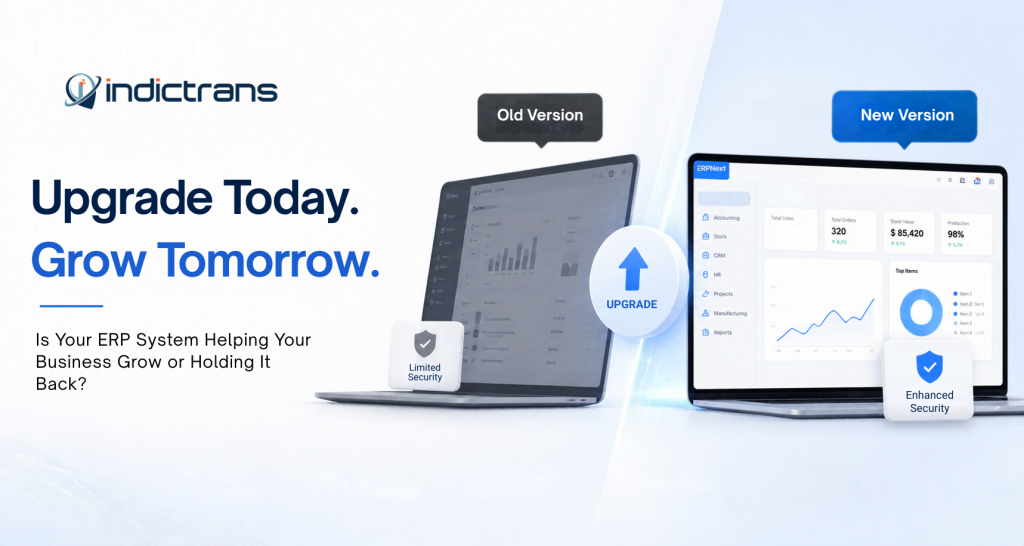
Before Upgrade | After Upgrade |
| Slow system performance | Faster day-to-day operations |
| Growing security concerns | Improved security |
| Limited features | Access to newer capabilities |
| Increasing maintenance effort | Easier system maintenance |
| Integration limitations | Better integration readiness |
| Difficult future changes | Easier future enhancements |
The goal isn’t simply to upgrade the software.
It’s to move your ERP from something you constantly maintain to something that actively supports the business.
Conclusion
A Frappe or ERPNext version upgrade may start as a technical project, but its impact goes much further.
It can help improve security, performance, usability, integrations, scalability, and long-term maintenance.
And while your current ERP version may still be “working fine,” that’s not necessarily the best measure of whether it is still the right version for your business.
Ready to Upgrade Your Frappe & ERPNext System?
Your ERP should support your business, not make it harder to move forward.
If you’re running an older Frappe or ERPNext version and aren’t sure whether it’s time to upgrade, Indictrans can help you evaluate your current setup and plan the next step.
From version assessment and customization review to migration, testing, deployment, and post-upgrade support, our team can help make the upgrade process smoother and more predictable.
We’ve successfully completed version upgrades for 13+ clients, with positive feedback on the overall experience and system performance.
Want to know what’s involved in upgrading your ERPNext system?
Schedule a Free ERPNext Upgrade Consultation!
For partial insights, do follow us on YouTube!