You’re getting dozens of invoices from suppliers every week. The warehouse needs visibility to stock. Production needs a timely supply of materials. And let’s not forget finance, which needs up-to-date cost numbers. So you’re burning up hours entering data, analyzing spreadsheets, and running reports.
This is where you can use AI in ERP. What is AI in ERP? It’s taking artificial intelligence and applying it to your ERP data and processes. This will free you from doing repetitive work, catch issues faster, and provide you with key information in a way that you don’t have to spend time reading multiple reports.
AI isn’t going to replace your ERP. Rather, it’s going to bring valuable information from your ERP system and give you better insight to get more work done quickly and efficiently.
In this article, we’re going to explore where you can use AI in ERP, what are the benefits of AI in ERP are, and how you get started.
What Is AI in ERP?
AI in ERP is the combination of technologies like machine learning, natural language processing, document recognition, generative AI, etc with an Enterprise Resource Planning system.
An ERP is an information system that is used to manage business information across departments. The AI is used to make sense of that information, find patterns, understand documents, detect anomalies, make recommendations, etc.
For instance, the ERP may be used to keep track of sales and inventory transactions. The AI model may then be used to analyze that history and make recommendations about what products need to be reordered based on changes in demand.
It is not about replacing the employee’s experience but about improving the way the employee works with business information.
How Is AI Different from Traditional ERP Automation?
The way traditional ERP automation works is by setting specific rules that tell the system what to do. For instance, “If this (low inventory) happens, then do this (reorder it).”
AI can make a recommendation based on more data. So maybe it will analyze data such as past sales, historical seasonality, lead times from vendors, current orders, etc., to determine a time when a stockout might occur.
So the difference is simply that automation is “rules-based,” and AI can learn from data and make inferences/recommendations. But they do not have to be mutually exclusive…
How Does AI Work With ERP Systems?
AI pulls data from ERP (and other integrated systems if needed).
A typical process looks like this:
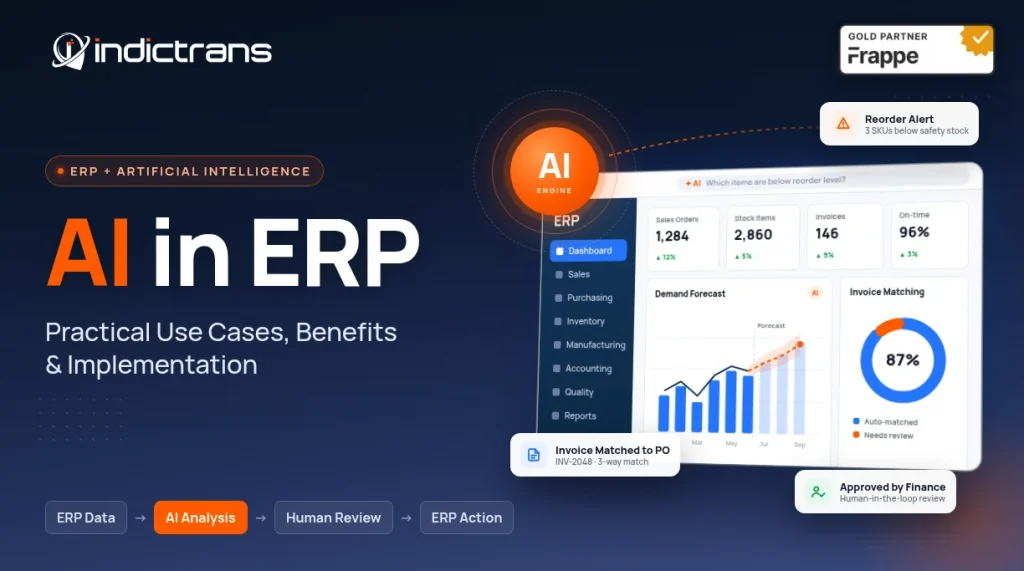
ERP Data → AI Analysis → Recommendation or Alert → Employee Review → ERP Action
For instance, AI can pull an invoice from a supplier, parse data from the invoice, match it to a purchase order, and alert to any mismatches. The finance team would then look at the invoice and give it approval.
AI may integrate with an ERP through native functionality, APIs, custom applications, integration platforms, etc. Which way to go really depends on your existing ERP and what you’re trying to automate.
8 Practical AI Use Cases in ERP
1) Demand Forecasting
AI can analyze past data (sales, seasonality, customer orders, etc.) to make predictions on future demand.
For example, a distributor might notice a pattern of higher demand for some products at certain times of the year, allowing the buying team to be prepared to order.
2) Inventory Optimization
Having too much inventory costs money, and not having key products slows down order fulfillment.
AI can analyze inventory turns, sales patterns, supplier delivery times, and current orders to identify products that might be out of stock or out of sales. These insights allow teams to prepare their buying and inventory transfers.
3) Automated Invoice and Document Processing
Invoice documents from suppliers, POs, shipping documents, and customer documents are frequently PDF, scanned documents, or spreadsheets.
AI for document processing can pull information (supplier names, invoice numbers, item information, quantities, and money amounts) from these documents and set up transactions in the ERP.
AI can also make some exceptions when the invoice, PO, and goods receipt don’t match. These would require human review before posting financial information.
4) Procurement and Supplier Analysis
AI can analyze supplier pricing, delivery performance, order quantities, and quality data.
For instance, it might point out that the delivery of a supplier has been inconsistent or has higher prices over the last couple of orders. The buyer team can determine the best course of action before the next order.
5) Production Planning
Manufacturers must juggle raw material availability, machine capacity, work orders, and due dates.
AI can analyze past production performance and current operating conditions to point out scheduling conflicts, estimate delays, and propose different production schedules.
The production team would still need to review the capabilities and business needs before adjusting the schedule.
6) Quality Control and Anomaly Detection
AI can spot anomalies in production data and inspection data. In addition, AI for computer vision can detect observable defects (cracks, missing pieces, surface damage) in manufacturing environments that have suitable camera systems.
These insights help quality teams focus on products or processes that should be checked closer, but AI just points out issues – it doesn’t replace quality controls and mandatory testing.
7) AI Assistants for ERP Data
Employees don’t need to open multiple reports to ask questions in plain English.
For example:
Which items are below their reorder levels?
What are our outstanding supplier payments?
Which customer orders are delayed?
How did production output compare with last month?
An AI assistant can pull and summarize pertinent data from the ERP (as long as it has secure access to the right data). The responses should provide links/references to the original data wherever possible.
8) Financial Reporting and Forecasting
AI can also help finance teams analyze transactional trends, suspicious spending, financial summaries, and cash flow forecasting.
For instance, AI might notice a spike in expenses for a specific department or may notice that customer payments are always late.
These insights are meant to help finance teams to start an investigation, not replace a financial review.
How AI Benefits Manufacturing, Distribution, and Retail Businesses?
The benefits depend on how each business operates.
Business type | Ways AI can help |
Manufacturing | Plan production, predict materials, ensure quality, manage machines |
Distribution | Plan inventory, evaluate suppliers, track warehouse, predict orders |
Retail | Identify demand, re-stock, determine trends, and manage returns |
All of these industries can be improved by AI to lessen manual data entry, search information faster, and make us aware of issues faster.
The most important thing to do is to solve an industry-specific problem well, instead of blindly applying AI to all areas of the industry.
AI Integration With Existing ERP Systems
Not every business needs to upgrade its ERP to use AI.
The ways to integrate AI include:
- Native AI capabilities: Leverage features already included in the ERP software.
- API Integration: Leverage APIs to integrate AI services with ERP data.
- Custom Applications: Develop custom AI applications focused on business processes.
- Integration Platforms: Leverage integration tools to link the ERP to 3rd party document processing, analytics or AI services.
Make sure to assess data availability, data security, integration complexity, total cost of ownership, and compatibility with your existing ERP version.
What Data and Infrastructure Are Required?
When AI is not receiving quality business information, the results are bad.
To have AI work well in a business context you need to feed it quality data about your business.
Examples of business data you may want to use include:
- Sales order history.
- Inventory and Stock.
- Vendor information.
- Purchase orders.
- Invoices.
- Manufacturing data.
- Quality control information.
- Financial transactions.
Additionally, businesses may want to consider:
- Consistent item numbering.
- Consistent customer data.
- Consistent vendor data.
- Quality transaction history.
- Quality units of measure.
- Secured APIs.
- Appropriate user permissions.
- Computational resources or AI as a service provider.
- Data Backup.
- Data monitoring.
- Audit trails.
Consider this: if you have duplicate items in your ERP system and wrong quantities, AI will not make good suggestions; master data clean up is a prerequisite to any meaningful results.
Challenges and Risks of AI in ERP
AI is imperfect, so you should be clear where it can act and where you need humans to act on AI recommendations.
Some typical concerns are:
- Data is crappy: Bad records mean bad outcomes for AI.
- Data privacy: Sensitive financial, supplier, and customer info to be handled well.
- Wrong answers: Generative AI can sound plausible but wrong.
- Security: AI assistants should respect permissions as if the employees were doing it.
- Integration cost: Technical effort to connect and support AI services.
- Results change over time: The model must be watched over time because conditions change.
Require humans to okay any sensitive items like payments, changes to supplier bank info, buying commitments, and financial adjustments.
Audit where the system is recommending, the humans are confirming, and where it is being posted.
How to Start Implementing AI in Your ERP?
You don’t have to automate the whole business overnight. Focus on one process that’s wasting employee time.
- Pick an area of repeated pain: think invoicing, inventory planning, reporting, or supplier analytics.
- Validate your ERP data: Confirm that data to analyze is correct and present.
- Pick the right tool: Consider inbuilt functionality, APIs, or custom AI integration.
- Do a mini pilot: Try with real (but contained) business data and a few users.
- Insert human in the loop: Important recommendations should be verified before executing.
- Quantify the outcome: Time to process, accuracy, manual touch, and operational efficiency versus the past process.
- Carefully scale-up: Broaden out to more use cases after successfully proving one.
How Indictrans Can Help
Indictrans engages in consulting, ERP transformation, integration, and automation to help companies optimize ERP processes.
Identifying where the time is being spent unnecessarily and finding ways to leverage AI for the specific process. Whether it’s just to get insights from the ERP data or integrate AI services and test workflows, the AI implementation needs to be tuned to suit the business as it is.
Interested in exploring AI for your ERP system? Speak to Indictrans about your business requirement.
Frequently Asked Questions About AI in ERP
How is AI used in ERP?
In ERP, AI is used for demand forecasting, inventory management, invoice processing, supplier analysis, production scheduling, quality control, financial reporting, and ERP natural-language query.
What is ERP in AI?
ERP is business management software that integrates key business processes including finance, purchasing, sales, inventory, and manufacturing. AI is a technology that could be used with ERP to interpret information, automate some functions, and make decisions. ERP itself is not AI.
What is the best AI for ERP?
The best AI tool for ERP depends on the business process, ERP platform, data privacy requirements, integration ability, accuracy needed, and budget. There is not one best AI tool for all ERPs.
Can AI take the place of ERP?
No. You cannot do without an ERP. ERP is for managing business data and transactions. AI is for interpreting data and enabling some functions and decisions. ERP and AI are different and related in their own ways.