The sales team checked stock; the warehouse confirmed availability; production looked at its schedule. But the raw material necessary to complete the order was still waiting for a supplier.
Now, the purchasing department has to follow up. Production may have to change its plan; sales may have to reevaluate the delivery date. This is what happens when the supply chain data is stored on multiple systems (ERP), spreadsheets, and teams. ERP in supply chain management connects all of these processes together so that companies can see what’s happening throughout their entire operation and base their decisions on the same information.
As orders, products, suppliers, and warehouse locations continue to grow, that connection will become more and more vital for manufacturers, distributors, and retailers.
We’ll take a closer look at what ERP in supply chain management is, how companies utilize it, what some of the potential advantages are, and what to think about when selecting and installing an ERP system.
What Is ERP in Supply Chain Management?
ERP (Enterprise Resource Planning) is a type of software used in business. The software links various parts of a company’s operations – i.e., purchasing, inventory, production, sales, and finance to one central system.
ERP helps a business coordinate all of the steps taken to bring a product from its initial state as raw material through to being delivered to the customer. This includes acquiring raw materials, keeping track of inventory, manufacturing the products, filling customer orders, and delivering those products to customers.
One of the primary benefits of ERP is that each function within a company does not need to maintain separate sets of records.
For instance, when a company receives purchased materials, the company’s inventory records can be updated. Production teams can then use this updated information to plan out their next projects. Purchasing teams can see what they currently have in stock and what they still need to order.
Financial departments can also access this information to perform inventory valuations and create financial reports.
While ERP systems provide many advantages over other methods of operating a business, they are not without their own limitations. The effectiveness of an ERP system relies heavily on several factors: how effectively the system has been configured; how accurate the data entered into the system is; and how closely teams adhere to established procedures.
However, an ERP system provides a base for companies to manage their entire supply chain operation from beginning to end.
ERP vs. Supply Chain Management: What Is the Difference?
SCM (Supply Chain Management) coordinates and plans the movement of goods, services, information, etc., from your vendors to your customers. An ERP (Enterprise Resource Planning) is a larger system used in many businesses. It has the ability to manage all aspects of your company’s operations, including purchasing, sales, finance and human resources.
The difference between the two is most evident in the way each operates. If a manufacturing company wants to buy the raw materials needed for its next production cycle, it would use SCM to determine which materials it needs to buy, when it needs to have them delivered, and where it will get them from.
Once that decision has been made, the manufacturer would then use an ERP to link together all of the various components of the purchase order process, such as:
material requirements, vendor information, purchase orders, receipt of goods into inventory, production requirements, and financial transactions related to the purchase order. SCM defines the supply chain processes that occur within a company, while ERP provides the tools and information necessary to allow those processes to function effectively.
What Is the Role of ERP in Supply Chain Management?
The purpose of an Enterprise Resource Planning (ERP) system is to provide a single source of truth for all data and processes involved in managing a company’s supply chain operations.
If there is no unified method for tracking information about suppliers and inventory, then different groups within the organization (e.g., procurement) will use different tools to manage this information; therefore, each group may have conflicting data regarding the same thing.
An ERP system can help bridge these disconnects among different groups by creating connections between their workflow and their records.
1) Connecting Suppliers, Procurement, and Inventory
The factors involved when making a purchase are many; they include what the company wants/needs, what they currently have available (in stock), who could supply those items, and how long it would probably take to receive them.
An ERP system allows you to link all the aspects of purchasing together: your supplier database, all of your requested purchases, quotes, actual purchase orders, receipts, and inventory information.
For example, say a manufacturer was getting ready for next month’s production. They review their material requirements and find out that one particular part is low. This will help guide the purchasing department in determining what they need to order and track that item from the time it leaves the vendor until it arrives at their facility.
2) Connecting Inventory, Warehouses and Production
Knowing how many items you have in your inventory is helpful; however, that knowledge will not provide answers to all of your inventory questions. What part of your warehouse or facility is storing this product?
How much of this product do we have available to sell or ship? Has some of this product been set aside to fulfill a customer’s order? Is the required raw material in the correct area (location) within our warehouse?
ERP systems can assist businesses with tracking inventory movement, transfers, material requirements, and inventory transaction processing related to production. Companies that operate out of more than one warehouse can use an ERP system to facilitate a more efficient way of reviewing their inventory data.
Instead of being forced to rely solely upon individual stock sheets from each location, teams can look at their collective inventory data from multiple locations at one time.
Although the collective view of your inventory data is enhanced by utilizing an ERP system, the timeliness of your receipts, transfers, consumptions, etc., will determine the level of accuracy of your collective view of your inventory data.
3) Connecting Sales, Orders, and Fulfillment
Sales teams have to understand the reality of what the company can provide. When a customer orders something, ERP can link the sales order to current inventory levels, production needs, and the logistics associated with delivering the product. If there isn’t enough product on hand, ERP will help determine if additional purchases or manufacturing are necessary.
While ERP provides the data and connectivity necessary to create an accurate delivery promise, lead time, capacity constraints, supplier commitments, and other business rules remain important.
However, it does provide a better view of all the relevant information required to make such a decision.
4) Connecting Supply Chain Operations With Finance
Supply chain decisions have a financial impact.
Purchasing affects costs and accounts payable. Inventory transactions affect stock valuation. Sales and deliveries connect with revenue and receivables. Manufacturing involves material consumption and production costs.
When these transactions are recorded in a connected ERP system, finance teams have a clearer basis for reviewing their impact.
Instead of waiting for information to be manually compiled from different departments, teams can work from connected operational and financial records, subject to the system’s configuration and reporting setup.
How Is ERP Used in Supply Chain Management?
ERP plays an important part in the day-to-day operations of a supply chain. When we look at how a product goes through the company, we will see where ERP comes in.
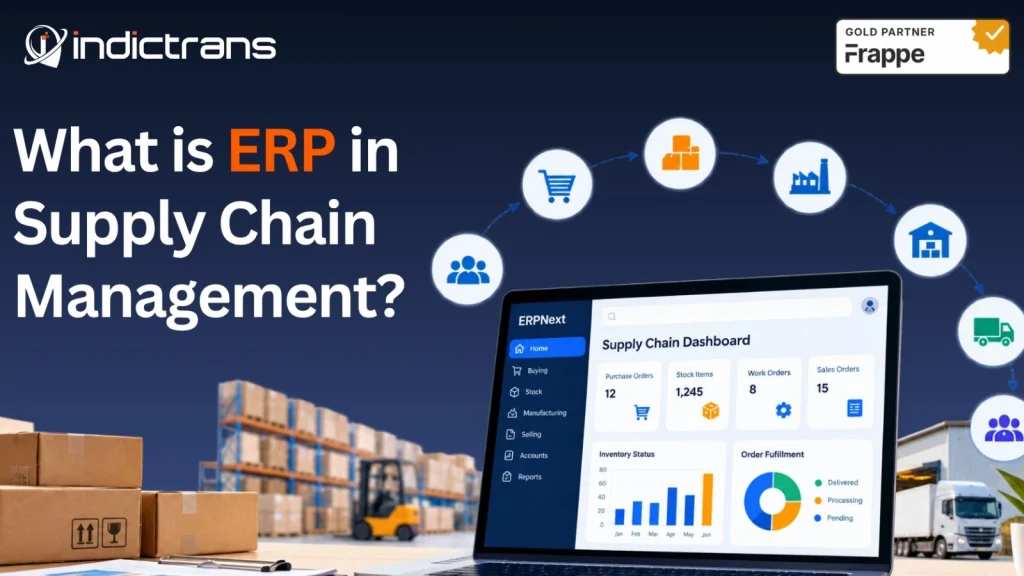
Demand and Sales → Planning → Procurement → Inventory → Production → Warehouse → Fulfillment → Finance
Let us consider what happens when a company gets a new customer order.
The sales order states what the customer wants. The company looks at what they have in stock and determines if they need to purchase anything else. The purchasing department takes care of the suppliers’ orders. The warehouse puts away the new items that arrived. Production uses the items they need.
After the item has been produced, the inventory system is updated. The customer’s order is then prepared for shipment. The same information is also sent to accounts receivable (invoicing) and general ledger (financial records).
Each type of business has its own way of doing things. A distributor would not have the same manufacturing flow as a manufacturer would. A manufacturer would have to plan out the materials needed and produce them.
Regardless of how each business does its job, all of the information developed during one phase of the process should be accessible to those who require it for the next phase.
This is why ERP helps with managing the daily activities of a supply chain, instead of just keeping track of all of the records once the activity has been completed.
Which ERP Modules Support Supply Chain Management?
ERP systems commonly offer a range of different modules which can be used in combination to manage the various elements of the supply chain process. The modules and their names vary depending on the product being used.
In addition, there are many requirements that may require further customization or integration with other applications.
1) Manufacturing and Production
Manufacturing modules may support bills of materials (BOMs), material requirements, production planning, work orders, and production activity.
These capabilities connect the materials required for manufacturing with the inventory available and the work scheduled on the production floor.
2) Sales and Order Management
Sales & Order Management handles all aspects of your customers’ orders, including the delivery process, invoicing, and keeping track of all relevant documentation. When linked to your Inventory and Production systems, this will allow you to compare your customers’ needs for products with how much product you have on hand or need to make.
3) Finance and Accounting
Supply Chain Decision-Making & Its Financial Implications
A company’s financial position and profitability are directly affected by its supply chain.
In addition to affecting how much money a company has available for operations (i.e., working capital) as well as the amount of money spent on products or services (costs), the financial position of an organization can also be affected by what happens after a product leaves the warehouse.
Therefore, in addition to being concerned about the immediate impact of supply chain decision-making on working capital and costs, managers need to be aware of the longer-term impacts of those decisions on their organization’s overall financial health.
How ERP Improves Supply Chain Visibility From Supplier to Customer?
The ability to view your entire supply chain at once (without calling each team member individually) is referred to as “Supply Chain Visibility.” In other words, you have the ability to see everything going on within the supply chain.
For example, a manager may be interested in knowing if their supplier was able to deliver the right materials on schedule. Also, if they were able to get those same materials into production and if they will be able to ship the product out on time for their customers’ deadlines. If you have to call each team member and/or create a spreadsheet to find answers to these questions, it will take much longer than necessary to create an accurate snapshot of the current state of affairs. This is where ERP comes into play. ERP ties all of the pieces of the puzzle together.
1) Supplier and Procurement Visibility
Teams responsible for purchasing will be able to review their purchasing orders, detail on suppliers, status of each order, receipts for those items they have purchased and any remaining needs. With this information at hand, they can determine the number of orders that remain open; and if there is a need for follow up with suppliers.
Although actual supplier updates and delivery information may require manual input or integration into the systems.
2) Inventory and Warehouse Visibility
Teams have access to inventory balances and all stock movement data for each location supported by their system.
Having access to this data allows teams to address questions such as: What is in stock and at which location? Where are items currently located? How much stock is reserved for future use? Should we move some stock from one location to another? Do we need to order more stock to meet demand?
The accuracy of the team’s ability to see this information will depend on maintaining accurate records of the inventory at each location and configuring the proper warehouse processes to manage the inventory.
3) Production Visibility
When your manufacturing team understands which materials they will require, how much of each material is available to them at this time, and how production has been moving forward on schedule.
Having all three components (inventory, material requirements, and production records) in one location allows your manufacturing team to be able to see when there might be a shortage of a particular item or an upcoming delay in your production plan before it becomes too late to make adjustments.
4) Order and Fulfillment Visibility
Sales and operations groups have an accurate picture of the progress of orders. Sales order information combined with inventory levels, production schedules, and delivery status provides sales. Operations teams have insight into which orders are complete and waiting to be shipped; which orders are incomplete and waiting on additional product; and which orders will require further action by the team.
5) Management Visibility
Management requires an understanding of how the supply chain is being stressed by its own processes. More than simply a listing of transactions, management must determine how the supply chain’s performance has deteriorated due to its process shortcomings. Information and reporting systems may assist in identifying late order placement, inadequate or excessive levels of inventory, production difficulties, as well as delays in customer delivery.
However, the objective of providing this type of information is not to generate additional dashboards. The goal is to provide management with the ability to quickly recognize potential problems within the supply chain and to enable them to take timely corrective action.
What Are the Benefits of ERP in Supply Chain Management?
When an organization installs ERP, the success of the installation depends upon the type of business, the current process flow within the company, and the level of implementation. If an organization designs the ERP system based upon its operational requirements, there are many opportunities for improvement.
1) Better Visibility throughout the Supply Chain
A single record that is connected to all parts of the supply chain (from purchasing to inventory, from production to shipping) allows organizations to track all aspects of their supply chain. With this capability, organizations can easily determine the location of each item in the supply chain at any given point in time.
Additionally, since the records are connected, organizations do not need to spend as much time gathering information from various sources; instead, they can focus on taking action on the information.
2) Better Inventory Control
Organizations can utilize accurate inventory records to assess the availability of stock, the movement of stock, and the requirements for stock across multiple locations. By having access to accurate inventory records, organizations can make more informed decisions regarding restocking and can avoid many issues that arise due to inaccurate stock information.
3) Better Procurement Planning
When organizations link purchasing activities with inventory levels and operational requirements, procurement teams have a clearer understanding of what items should be purchased. Furthermore, organizations can easily review outstanding purchase orders and identify materials that could negatively affect production or delivery schedules.
4) Less Manual Process
When organizations implement ERP systems correctly, they can eliminate many repetitive manual processes.
For example, when organizations receive materials, the receipt information can be automatically updated in the inventory record without having to manually input the same receipt information into several spreadsheet documents.
5) Better Planning
By connecting sales, inventory, procurement, and production data through a single ERP system, planning teams have a more comprehensive view of the organization’s needs. As a result, planning teams can make more informed decisions using a broader perspective of the organization rather than relying solely on individual records.
6) Faster Decision Making
When data is entered into a consistent format and reports are developed appropriately, teams can obtain answers quickly without having to wait for someone to gather data manually. However, the speed of decision-making relies heavily upon the quality of data entered into the system, the configuration of reports developed by the system, and how consistently employees use the system.
7) Better Collaboration among Teams
Procurement, warehouse, production, sales, and accounting departments often rely on each other’s work. A common system enables organizations to establish clearly defined relationships among departments and minimize the potential for teams working with contradictory information.
8) Cost Savings
Although ERP systems typically do not reduce costs directly, they provide organizations with a method to analyze costs associated with purchasing, inventory, production, etc., on a consistent basis.
Example of ERP in Supply Chain Management
The Company’s supply chain is comprised of suppliers, raw materials, manufacturing facilities and warehouses; all located in different areas. The Company receives customer orders at various times during each week. A portion of these orders will consist of items which are currently available from the Company’s existing inventory.
However, the remainder of these orders will require the Company to produce the item requested by the customer. In order for the Company to fulfill its obligation to the customer, it must ensure that all processes related to procurement, inventory management, production scheduling, warehouse operations and delivery are coordinated properly.
An example of how an ERP system can help manage this process follows below.
Example: A Multi-Location Manufacturer
Customer demand enters the ERP.
The sales team records a customer order with the required products, quantities, and delivery details.
Inventory availability is checked.
The business reviews available finished goods and identifies which items can be fulfilled from existing stock.
Production requirements are identified.
For products that need to be manufactured, the team reviews production requirements and the materials needed to complete the order.
Missing materials create procurement requirements.
If required materials are unavailable, purchasing can review the shortage and arrange the relevant supplier orders according to the business’s planning and approval process.
Materials are received and inventory is updated.
When the materials arrive, the receipt is recorded and the stock position is updated.
Production uses the required materials.
The production team records material consumption and the progress of the manufacturing work.
Finished goods move into inventory.
Once production is completed and the finished goods are recorded, the warehouse can review their availability.
Customer orders are fulfilled.
The warehouse prepares the goods for dispatch, and the delivery process is recorded.
Financial records are updated.
The related purchasing, inventory, production, sales, and invoicing transactions feed into the relevant financial records according to the ERP configuration.
The value does not come from any one step. It comes from connecting the steps so that purchasing, production, warehouse, sales, and finance teams can work with consistent information.
For a business operating across multiple locations, that connection can be especially useful. Teams still need clear processes and accurate records, but they have a shared system to support the work.
How ERP Automation Can Improve Supply Chain Processes?
Many processes involved with managing the flow of products/materials in a supply chain have repetitive components. Approval of a purchase request, updating an order, checking inventory, notifying a team member, or creating a report are examples of such repetitive processes. When configured properly, ERP automation will assist in reducing the amount of manual work required to complete these repetitive processes. As long as the appropriate processes/workflows are established using the correct business rules, ERP automation will provide assistance in reducing the manual effort associated with these types of processes.
Purchase Request Approval Workflow
Using established rules (i.e. department, purchase price, limit for approval), a purchase request can be directed to the appropriate individual(s) to approve it. Establishing a workflow for purchase requests will allow for a clear path of approval and eliminate the necessity of following up with email for each purchase request.
Replenishment and Material Requirement
Depending upon the type of ERP system being used and its configuration, the current level of product/material inventory, re-ordering procedures/rules, and the quantity of product/materials needed will assist in determining when products/materials require attention. Different ERP systems have different levels of capability for replenishment and planning. Some organizations may require supplemental planning tools to manage complex demand or supply requirements.
Updating Orders and Inventory
Connected transactions will assist in eliminating the manual updating of identical information in multiple locations.
For example, documenting a receipt of goods or a transfer of stock will automatically update the related records in the workflow established for updating inventory.
Alerts and Notifications
ERP workflows can inform relevant individuals of impending approvals, insufficient stock, delays in completing transactions, or other situations. The effectiveness of these alerts is dependent on identifying and directing the correct trigger(s) to the individuals who can address them.
Reports and Dashboards
Scheduled reports and dashboards will reduce the amount of time spent gathering operational data for routine evaluations. Potential areas for reporting include stock levels, open purchase orders, supplier performance, status of production, or completion of orders.
A well-defined process must serve as the basis for automation. Automating a confusing or unclear approval process or utilizing incorrect inventory data will only expedite the occurrence of the same problem(s).
What Problems Can ERP Solve in Supply Chain Management?
ERP helps resolve multiple common operational issues, primarily when those issues occur due to disconnect between process and information. Let’s take an example of a company whose Purchasing Department manages all of their purchases via email; Warehouse Operations maintains separate spreadsheet files for each of their warehouses; Sales Teams rely on manual updates to view current stock levels. A Manager preparing a Supply Chain Report will need to gather information from all three departments prior to determining the exact status.
Examples of problems that ERP can solve are:
- Information regarding Inventory is located in many places: ERP allows for a single location for reviewing Inventory status throughout all supported warehouses.
- Managing Purchases via email and spreadsheets: Workflow Automation provides the ability to manage Purchasing Requests, Approvals, Orders and Receipts within a more consistent manner.
- Supplier Information is disconnected from Procurement: Supplier Records and Purchase History can exist next to Purchasing Transaction Data.
- Sales & Production using different sources of Information: Order Records, Inventory Records and Production Records can provide greater coordination between these two departments.
- Lack of Visibility within Warehouse Operations: Transaction Records related to Stock Transactions and Records of Warehouse Operations can enable Teams to monitor the flow of Inventory.
- Repetitive Manual Data Entry: Automated Workflows can minimize repetition of Data Entry caused by Transaction Integration.
- Utilizing Different Systems by Different Departments: Core Business Processes can be unified within ERP; however, External Systems may be necessary for Specialized Functions.
- Difficulty Measuring Supply Chain Performance: Suitable Reporting & Dashboards along with Consistent Records can assist Teams in measuring Operational Performance.
- Management Reports Taking Too Long to Prepare: Automated Reports & Dashboards can eliminate Manual Data Collection.
There is one significant difference between what ERP can do for your business and what it cannot. ERP cannot resolve a poorly designed Supply Chain Process on its own. Your Processes must be Mapped Correctly.
Your Data must be Accurate. Your Integrations must Function Properly. Your Users must adhere to the agreed-upon workflows.
And finally, your Reports must Answer the Questions Your Business Actually Asks. If you lack this foundation, then your New System could potentially replicate the Same Problems in a new location.
How to Choose an ERP for Supply Chain Visibility?
It is important to select an ERP that is designed to match the way your supply chain operates; not simply by selecting one with a long list of impressive features.
Prior to beginning a comparison of various ERP platforms, you should determine the type of information your teams require, where visibility currently lacks, and the process areas that are currently disconnected.
1) Document Your Current Supply Chain Processes
Begin by mapping out the current methods used by your procurement, inventory, warehouse, production, sales, and finance departments.
Examine how orders are placed, approved, stocked, scheduled for production, and delivered. By documenting these processes, you will create a framework for determining whether an ERP could potentially support them.
2) Identify Visibility Gaps
Ask each department what they struggle to obtain information about. Does purchasing know what open orders exist? Do warehouse personnel know what stock is available at all of their locations? Can production identify when they have a shortage of materials prior to scheduling work? Can sales ascertain if an order can be fulfilled? The answers to these questions should be used to establish your ERP requirements.
3) Define Your Integration Needs
Most companies utilize software programs outside of an ERP system (e.g., e-commerce sites, warehouse management systems, transportation management systems, supplier portals, etc.). Determine which of these systems require integration with the ERP.
Additionally, determine what information must pass between each system and how often this information must be updated. It is essential to define your integration needs during the planning stages and not as an afterthought.
4) Evaluate Multi-Site Requirements
If your company has multiple plant locations, warehouses, retail stores, or distribution centers, evaluate how the ERP system manages multi-site operations (e.g., stock transfers, intercompany reporting, user access rights, and overall operational controls). The primary concern is whether the ERP system can provide the appropriate level of visibility and control throughout your company’s sites.
5) Assess Reporting/Analytics Requirements
Create a list of the data/reporting needs for each team member to make informed decisions. Examples include stock availability, outstanding purchase orders, vendor lead times, production status, order fulfillment rates, and financial implications of fulfilling/not fulfilling an order. Determine if the ERP provides the necessary reporting capabilities or if additional reporting/analytics tools or customizations/integrations will be required.
6) Evaluate Configuration/Scalability Capabilities
The ERP system must be able to support your existing business processes and allow for future modifications without creating unnecessary obstacles.
Evaluate your projected transaction volume; number of products sold; geographic scope of your business operations; integration requirements; reporting requirements; and potential operational changes.
Also evaluate how much configuration/customization would be required to implement the ERP system and how those decisions may impact future maintenance/upgrades.
ERP Implementation Matters as Much as ERP Selection
You have made a good choice with an ERP system but this is only one part of the problem. Even if you choose an ERP that is very capable, it will still be unable to give you the type of visibility you want for your supply chain unless your implementation was done correctly to reflect how your company operates. There are several reasons why this may occur:
- When processes were not mapped prior to configuring them in the ERP.
- When the supplier, product and inventory information (master data) entered into the ERP was incorrect.
- When some of the necessary interfaces/integrations were not developed fully. When the workflow developed does not align with the way the company needs to operate.
- When employees continue to maintain separate records of transactions that were processed outside the ERP.
- When the reporting requirements were not identified clearly. When employees did not get sufficient training and/or support.
These problems are not resolved by simply adding additional functionality.
The implementation must address the underlying process, data, integration, and user requirements.
How Indictrans Helps Businesses Improve Supply Chain Operations With ERP?
ERP can only enhance supply chain visibility if it’s designed to reflect how the business operates. At Indictrans, we collaborate with manufacturers, distributors and retailers to analyze existing process flows, find holes in operations, and upgrade the ERP systems that support the supply chain.
We combine our Supply Chain and Operations Consulting services with ERP Implementations and Transformations; therefore, all technology related decisions will be made based on your business needs.
Understand Where Your Current ERP and Processes Fall Short
Through ERP & Technology Consulting services we evaluate current processes, ERP setup, data, integrations, and supply chain needs. The goal is to determine where there is a disconnect in information flow; what tasks are done manually; and what prevents the organization from having greater visibility into their operations.
For instance, an organization may believe they need a new ERP system due to problems with their inventory reporting.
However, after reviewing the situation further, it will become evident that the larger problem is the lack of consistency in how they record inventory transactions; the manual nature of many aspects of their warehouse operations; or the failure to develop adequate integration requirements.
By identifying the root cause of these issues we can identify what needs to be changed before recommending a particular course of action.
Build or Improve ERP Around Your Supply Chain
Indictrans provides ERP Transformation Services to help organizations with implementing a new ERP, moving from an old ERP, or optimizing their current ERP.
We are a Gold Certified Partner of ERPNext and we provide services to organizations for ERPNext Implementation, Customization, Migration, Integration, Optimization and Ongoing Support.
Our primary goal is to connect all the appropriate processes together that include Procurement, Inventory, Warehouses, Manufacturing, Sales and Finance. The specific solution that will meet your needs will vary based on what those needs are.
There may be some requirements that can be met using the standard functionality of ERPNext; however there may be other requirements that may require you to configure ERPNext, customize it to fit your needs, integrate it with other systems, and/or utilize additional software.
If you’re looking into purchasing a new ERP or trying to get better value out of your current ERP, you’ll need to begin by understanding your Supply Chain Requirements and the Deficiencies within your current processes.
Conclusion
Connecting the information that exists at every level of an organization’s supply chain (i.e., information related to suppliers, procurement, inventory, production, warehouse operations, sales, fulfillment, and finance) is what ERP in supply chain management is all about. The ability to connect these various aspects of the supply chain through one single interface will provide teams with a better understanding of current stock levels, required purchases for future needs, necessary production levels based on demand, and the status of customer orders.
As a result of this connection, teams can easily coordinate their efforts and identify potential problems within their organizations’ operations before they become larger problems.
While a fully integrated system is certainly beneficial to organizations attempting to optimize their supply chains, it is not enough. The accuracy of data collected within the system, the development of efficient workflows, the integration of third-party systems into the main system, and the adoption of users using the system all play an integral role in determining whether or not the implementation of such a system will ultimately yield positive outcomes.
Indictrans can assist organizations in identifying where deficiencies exist in their current methods of collecting and organizing supply chain data and developing recommendations for improvement if the organization has its supply chain data residing on multiple platforms such as ERPs, spreadsheets, etc.
Frequently Asked Questions About ERP in Supply Chain Management
What is ERP in Supply Chain Management?
ERP in Supply Chain Management means utilizing Enterprise Resource Planning (ERP) software to connect various functions such as Procurement, Inventory, Warehousing, Manufacturing, Sales and Finance. By sharing information among different departments, ERP allows teams to collaborate in coordinating all aspects of the supply chain.
What does ERP do in Supply Chain Management?
ERP integrates all the processes, records and workflows across the enterprise that relate to the supply chain. ERP provides businesses with the ability to monitor transactions involving purchasing, inventory, production, orders and financial transactions using one central system. The extent of visibility provided by an ERP system will depend upon how well it has been configured, how complete its data is, and how many other systems have been integrated with the ERP.
How is ERP used in Supply Chain Management?
Businesses utilize ERP to manage activities such as ordering raw materials, receiving and transferring stock, developing production schedules, processing sales orders, shipping products and recording the associated financial transactions. Integrating these different functional areas through a single ERP system enables teams to operate with a shared pool of information rather than having each department independently manage its own processes.
What are some of the advantages of utilizing ERP in Supply Chain Management?
Utilizing ERP in Supply Chain Management offers several advantages to organizations including: Increased visibility into the supply chain. Better control over inventory levels. Improved efficiency in Procurement Planning. Greater collaboration between departments. Easier access to reports detailing operations. Elimination of redundant data entry. Improved ability to control costs through efficient workflow design and accurate record keeping.
Is Supply Chain Management a vital part of ERP Software?
Many ERP systems include features and modules related to Supply Chain Management. However, the extent of the functionality and the availability of specific modules vary greatly among ERP vendors. Most ERP systems integrate features relating to Procurement, Inventory, Manufacturing, Sales and Finance. Organizations requiring additional specialized planning, warehousing, logistics, supplier or analytic software typically require integration with their ERP.
Which ERP Modules are commonly utilized for Supply Chain Management?
There are six common modules within ERP that relate to Supply Chain Management. These modules include: Procurement/Purchasing Inventory Management Warehouse Management Manufacturing/Production Sales/Order Management Finance/Accounting The specific modules utilized depend upon the ERP platform selected by the organization, as well as the organization’s unique operational needs.
Can ERP enhance Supply Chain Visibility?
Yes, ERP can increase supply chain visibility by integrating information regarding suppliers, purchase orders, inventory, production facilities, warehouses, and customer orders. The effectiveness of this integration depends on: Accurate data entry. Well-designed workflows. Integration with other critical systems. Consistent utilization of the ERP system.
Can ERP replace Supply Chain Management Software?
It depends on the complexity of the organization’s supply chain. While ERP can support many core functions (e.g., Procurement, Inventory, Manufacturing, Sales, Finance), companies with specialized needs may continue to require separate planning, warehousing, logistics, supplier or analytical software that integrates with their ERP.