Many US-based companies manage daily operations by coordinating purchasing, inventory, sales, fulfillment, and accounting. For example, a manufacturer may need to coordinate production at several different locations, whereas a distributor may need to manage inventory across multiple warehouses and receive customer orders through multiple channels.
If all of these teams are using different systems or spreadsheets, it will become increasingly difficult for the company to get a complete view of its business. ERP stands for Enterprise Resource Planning; it’s a software solution that brings all of your company’s main business processes and data into a single platform.
This allows employees to share data, collaborate on projects, and monitor activity throughout the entire organization. We will describe what an ERP system does, how each module works with others, and what US-based companies need to think about before selecting an ERP system.
What Is an ERP System?
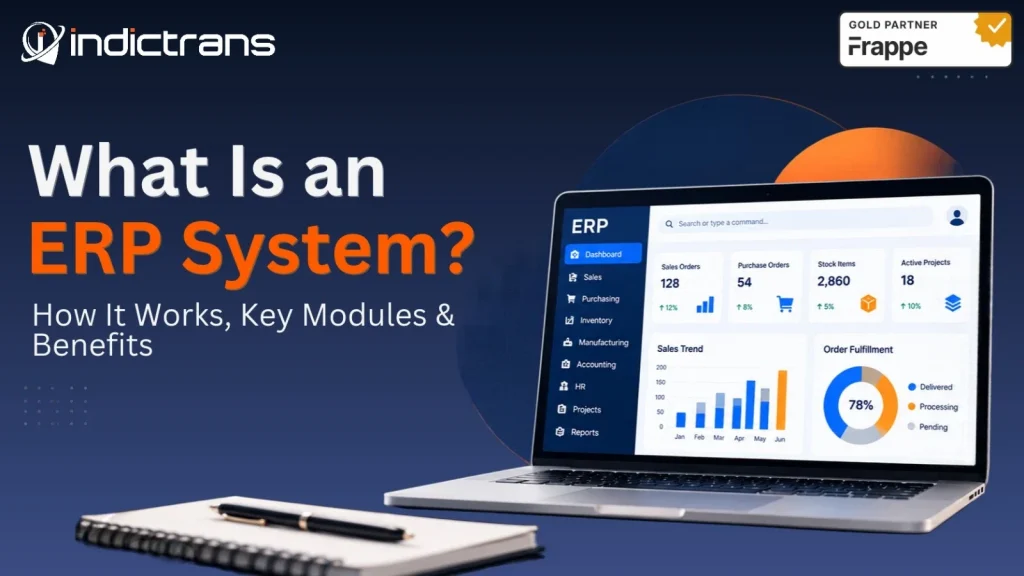
An ERP (Enterprise Resource Planning) system is a kind of business software that brings together several of the most important aspects of a company’s operations, such as finance, purchasing, inventory, sales, manufacturing, and human resources. When a company uses an ERP system, it does not need to separately manage each area of its business; rather, it can use connected workflows and share information among all departments.
People often use terms like “ERP system,” “ERP software,” or “ERP solution” when discussing this type of system; however, they are all referring to the platform a company uses to conduct its business.
What Does ERP Stand For?
ERP stands for Enterprise Resource Planning. Simply put, ERP is the integration of business processes to plan and manage all of an organization’s resources and operations.
What Does an ERP System Do?
An ERP system will assist in managing finance and accounting; purchasing/procurement; inventory; sales; manufacturing; warehousing; supply chain management; and human resource functions. The modules that a company uses depend on its needs and what is available in its ERP platform.
How Do ERP Systems Work?
ERP systems enable the use of integrated transactions and work flows between many different departments. When a distributor receives an order from a customer, the system verifies that there is sufficient inventory available to complete the order; provides support to fulfill the order; records the shipment of the product; and links the invoicing of the product to the accounting department.
Customer Order -> Verify Inventory -> Fulfill Order -> Ship Product -> Invoice Customer -> Link to Accounting.
ERP systems typically provide support for this flow through
- Centralizing Data: All teams have access to a single Connected Business Record as opposed to each team having their own copy of the same record.
- Connecting Workflows: Based on how your ERP is configured, one transaction may cause updates to several other related processes.
- Roles & Approvals: Permissions and Approval Steps are utilized to control which users can perform specific tasks.
- Reporting: Connected Data enables teams to analyze both operational and financial performance.
How many levels of ERP systems are there?
There is no single set of numbers that can be applied to all ERP systems. However, a good way to understand how ERP systems operate is by looking at them in terms of three layers:
- Presentation Layer – Employees use these screens and interfaces.
- Application Layer – Business logic, calculations and workflows.
- Data Layer – Databases and other systems where business data is kept.
This is a conceptual model; the technology used to create each layer will differ depending upon the platform.
What are the main ERP modules?
ERP modules are software applications that perform a particular business function but share information with other parts of the ERP system.
- Finance & Accounting: General Ledger, Accounts Payable/Receivable, Budgeting, and Financial Reporting.
- Procurement: Supplier Management, Purchase Requests/Orders, and Approval Processes.
- Inventory Management: Tracking Stock Levels, Locations, Transfers, Valuations, and Replenishments. Sales & Order Management: Creating Quotes, Processing Customer Orders, Fulfilling Orders, and Generating Invoices.
- Manufacturing: Creating Bills of Materials (BOM), Planning Production, Issuing Work Orders, and Tracking Material Usage.
- Warehouse Management: Receiving Goods, Storing Them, Picking Them Up, and Shipping Them Out.
- Supply Chain Management: Coordinating Activities Among Suppliers, Purchasing, Inventory Management, Production Scheduling, and Distribution.
- Human Resources: Maintaining Employee Records, Tracking Attendance/Leave, and Processing Payroll.
Not every business needs every module. A service-based business may have different needs than a manufacturing or wholesale distribution company.
What Are the Main Types of ERP Systems?
ERP systems can be deployed in different ways.
| Type | How it works | Key consideration |
| Cloud ERP | Hosted in a cloud environment and accessed over the internet | Provider arrangements, connectivity, and ongoing costs |
| On-premise ERP | Installed and managed on the organization’s infrastructure | Internal IT resources, maintenance, and infrastructure |
| Hybrid ERP | Combines cloud and locally hosted systems | Integration and management across environments |
What Is Cloud ERP?
Cloud ERP is an ERP solution that is hosted in a cloud environment and accessed over the internet. A business may be able to avoid having to manage its own ERP infrastructure depending on the provider and service agreement. When choosing a cloud ERP, businesses should evaluate how they will access data; security; integration options; customization; ongoing costs; and what responsibilities the provider has.
What Are Examples of ERP Systems?
The type of ERP system used by companies varies greatly. Some examples of ERP systems include ERPNext, SAP, Oracle NetSuite, Microsoft Dynamics 365, and Odoo. All of these systems have varying features, prices, and implementation requirements and fit into different types of industries.
When selecting an ERP system for your company, U.S. businesses should choose based on how well the system will integrate into their existing business processes, reporting needs, integration capabilities, budget, and plans for future growth, as opposed to solely selecting a brand name.
What Are the Primary Business Benefits of an ERP System?
An ERP system will provide many advantages to your organization; however, the extent to which you receive those advantages depends upon how well the ERP system meets the needs of your organization and how effectively your employees utilize the ERP system.
There are several typical advantages that organizations experience when they implement an ERP system, including:
- Access to Related Business Information: Your employees will have easy access to related purchasing, inventory, sales, and financial records.
- Reduced Manual Work: With data sharing and automated workflows, there is less need for duplicate entry and routine hand-offs.
- Improved Inventory Management: By connecting purchasing, stock, production, and order information, organizations can make better decisions regarding their inventory based on more accurate and timely information.
- Improved Planning: Teams can work together to review material requirements, production schedules, orders, and resource availability.
- Improved Financial Management: Operational transactions can be linked directly to accounting records, allowing finance teams to monitor business activities.
- Improved Reporting Capabilities: Structured data provides both operational and financial reporting capabilities.
- Support for Expansion: As your organization grows, an ERP system can be configured to accommodate additional warehouses, facilities, stores, or offices.
While each of these advantages may be available to your organization through the use of an ERP system, none of them are guaranteed. Data quality, process design, implementation, and employee adoption all contribute to whether or not your organization achieves these advantages.
How Do ERP Systems Help With Audit and Compliance Readiness?
ERP systems can help prepare for audits through transaction records, audit trails, user permissions, approval workflows, and financial reporting. These features can allow businesses to trace activities and review how transactions were processed.
However, simply implementing an ERP system does not guarantee compliance. Compliance depends on the specific requirements of each business and its jurisdiction (e.g., U.S. tax laws, financial reporting requirements, industry regulations). Businesses should ensure that their system configuration and internal controls meet the requirements that apply to them.
What Is ERP Integration?
ERP integration is the process of connecting an ERP system with other applications so that information can flow between them. Some examples of integrations include CRM, eCommerce, point-of-sale systems, banking and payment services, shipping providers, payroll, supplier platforms, and business intelligence tools.
For example, an eCommerce integration can send customer orders into an ERP system where inventory, fulfillment, and invoicing processes can take place. Successful integration requires reliable data mapping, testing, and ongoing maintenance.
What Is ERP Implementation?
ERP implementation is the process of configuring the system to support business processes. This typically includes:
- Reviewing business requirements and existing workflows.
- Selecting the ERP and developing a project plan.
- Configuring the system and workflows.
- Cleaning and migrating data.
- Setting up integrations and required customizations.
- Testing processes and resolving issues.
- Training employees.
- Going live (moving into production).
- Providing post-go-live support and making improvements.
The timeline for implementation varies greatly depending on the scope of the project, quality of data, integrations, customization, and organizational readiness. Installing software is only one component of implementation.
How to Choose the Right ERP System for Your Business?
Start with identifying the business problems you need to solve rather than creating a long list of software features. Prior to selecting an ERP system, consider:
- Business Processes: What activities need to be connected or improved?
- Industry Fit: Does the system meet your operational requirements?
- Integrations: Can it connect with your existing applications?
- Reporting: Can it provide the information that managers need?
- Growth: Will it support additional users, locations, and operations?
- Implementation and Support: What migration, training, configuration, and ongoing support will be required?
- Total Cost: Include software costs, implementation costs, integration costs, training costs, support costs, and internal staff time costs.
Compare shortlisted systems against these criteria prior to making a decision.
How to Calculate the ROI of an ERP System?
ERP Return on Investment (ROI) is calculated by comparing the financial benefits of an ERP project to its total cost.
ERP ROI = (ERP Benefits − ERP Costs) ÷ ERP Costs x 100
Costs can include software costs, implementation costs, migration costs, customization costs, integration costs, training costs, support costs, and internal staff time costs. Potential benefits include time saved, fewer manual errors, improved inventory control, reduced duplicate work, and increased productivity. Measure changes over a defined period of time and use realistic estimates. Some benefits, such as improved visibility, may be valuable even if they cannot be easily quantified in terms of immediate cost savings.
How Indictrans Helps Businesses Plan and Implement ERP?
Choosing ERP software is only one part of the project. The system must also align with the business’s processes, data, integrations, and operational requirements. Indictrans assists businesses in assessing current processes, planning ERP requirements, implementing ERPNext, migrating data, building integrations, improving existing ERP systems, and providing support after go-live.
Our services include:
- ERP & Technology Consulting: Assess requirements and determine the best approach.
- ERP Transformation: Support ERP implementation, migration, integration, customization, and optimization.
- Analytics & Intelligence: Improve reporting and operational visibility.
- AI & Automation: Identify opportunities to reduce repetitive work.
- Managed Services: Provide ongoing ERP support and improvement after go-live.
Planning an ERP project or looking to improve your existing system? Talk to an ERP expert. →
Conclusion
An ERP (Enterprise Resource Planning) system integrates business processes, information, and teams to allow organizations to operate more consistently and with better visibility.
The type of ERP system that will be most beneficial for an organization is based upon their specific business needs; however, the success of any ERP system is dependent upon having accurate data, effective workflows, and successful implementation.
Are you considering purchasing a new ERP system or looking to enhance your current ERP system? Contact Indictrans to discuss your ERP needs.
Frequently Asked Questions About ERP Systems
What is an ERP system?
Resource Planning (ERP) system is a software application that links together various business functions, including accounting, purchasing, inventory, sales, and production, using shared data and workflow.
What are some of the most common modules used in ERP systems?
Some of the most commonly used modules in ERP systems are Finance, Procurement, Inventory, Sales, Manufacturing, Warehousing, Supply Chain Management, and Human Resources.
What is the difference between ERP and Accounting Software?
Accounting software is primarily designed to handle financial transactions and report on them. ERP has the ability to link accounting with other business processes such as purchasing, inventory, sales, production, etc.
What is the difference between ERP and CRM?
ERP is used to manage all aspects of a company’s operations and resources. CRM is used to manage customer relationships, sales activities, and customer interactions. Both systems can be linked together to share data.
How long will it take to implement an ERP system?
Implementation times vary based on the scope of the project, size of the business, quality of data, number of integrations required, and level of customization needed. A well-defined project may take less time than a large-scale, multi-site implementation.
How much does an ERP system cost?
Costs vary based on the platform chosen, number of users, deployment method, scope of implementation, number of integrations required, training required, and level of support required. When determining the total cost of ownership (TCO), consider the long-term costs associated with the system rather than just the initial price of the software.
Can an ERP system integrate with my current business systems?
Yes. Depending on the platform selected and your technical requirements, an ERP system can be integrated with other applications such as CRM, eCommerce, Payroll, Payment Processing, Shipping/Logistics, Reporting Tools, etc.
Is an ERP system only for large companies?
No. Businesses of all sizes use ERP systems. The type of system you choose should be based on the complexity of your business processes, the budget available, and which processes you need to link together.