Often businesses have some information which are not represented in standard fields of ERP. For example, a manufacturer can have some additional information on products, a distributor can have some information on suppliers, and a service company can have some information on projects.
There are many situations where in-house developers need to extend the data structure of ERP while retaining the current functionality of ERP.
How to extend the data structure of ERPNext, Odoo, and Microsoft Dynamics 365 is very different and varies based on technical skills, the complexity of development required, and the amount of control the team needs. ERPNext uses DocTypes and the Frappe Framework. Odoo uses Python ORM and model inheritance. Dynamics 365 uses product-specific extension tools.
What Does Control Over ERP Data Models Mean?
The ERP data model of a company defines how business information is stored, organized and connected within the ERP system. It is also the area where developers can extend standard ERP fields and records with custom data structures.
Typically, this involves 3 things:
- Creating custom data structures: to store information that the standard ERP system does not already track as records.
- Adding fields and relationships: Extending existing records and connecting them with other business information.
- Defining business rules: Rules can be set up to validate the data, restrict access and also define when and how data is entered and used.
For example, a manufacturer may need to track machine inspections as a separate record from production work orders but be linked to the work order to store inspection information with the corresponding production activity business information.
- Defining business rules: Setting validation, permissions, and conditions that control how data is entered and used.
For example, a manufacturer might need a separate record for machine inspections, linked to production work orders. The ERP should store the inspection details and connect them with the relevant production activity.
ERPNext vs Odoo vs Dynamics 365: How Do They Extend Data Models?
Each platform offers a different development approach. Here’s a practical comparison.
| ERP platform | Main development approach | What developers can extend |
|---|---|---|
| ERPNext | DocTypes, Custom Fields, Frappe Framework | Data structures, fields, relationships, and custom applications |
| Odoo | Python ORM, model inheritance, custom modules | Models, fields, methods, relationships, and business logic |
| Dynamics 365 | Product-specific extensions and development tools | Tables, fields, relationships, and application logic |
ERPNext: DocTypes and the Frappe Framework
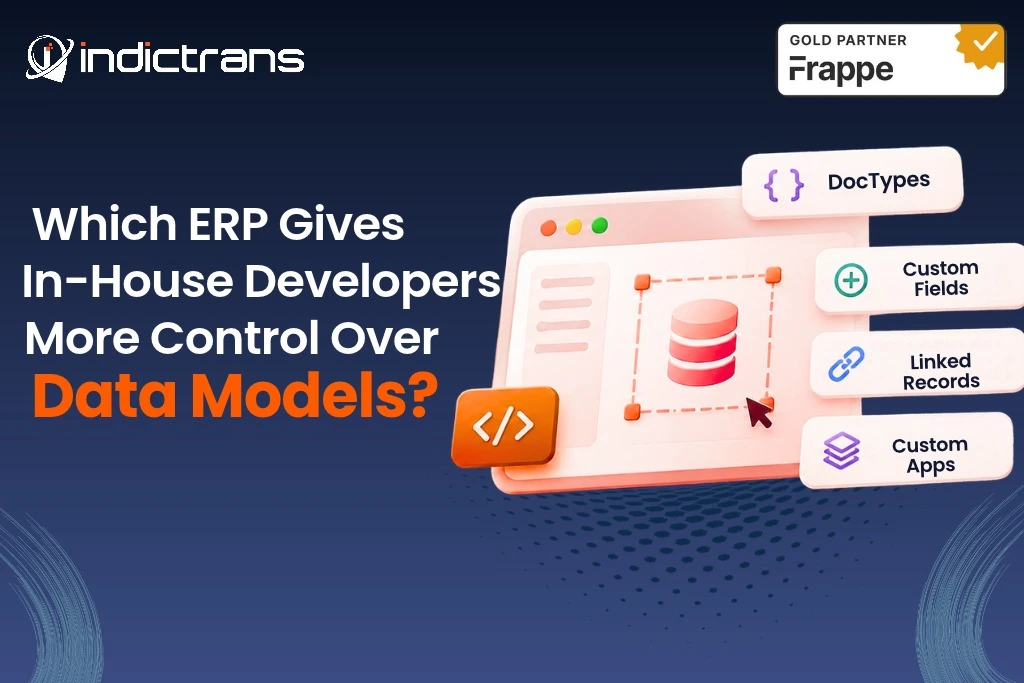
ERPNext is built on the Frappe Framework. DocTypes in Frappe define the structure and behavior of any business record. A DocType contains all information of the fields of a record, their types, and other properties.
Developers can:
- Create new DocTypes for business-specific records.
- Add Custom Fields to existing ERPNext records.
- Use Link fields to connect related documents.
- Use Child Tables to store multiple related rows within a parent document.
- Build separate custom apps using Python and JavaScript.
A manufacturer might, for example, create a custom DocType for machine inspection records and link these to work orders in a custom app. The development team can define the fields for the inspection, the validation for these fields, and the workflow for the inspection.
These simple changes can be managed via Customize Form. More complex changes require the creation of a custom app.
Odoo: Python ORM and Model Inheritance
Odoo relies on a Python-based Object Relational Mapping (ORM) to define models and their fields. These models can be extended by developers using inheritance.
Its main options include:
- Creating new models for more business records.
- Extending existing models with new fields and methods.
- Creating relationships such as Many2one, One2many, and Many2many.
Create custom modules to organize your extensions and business logic.
In addition, Odoo Studio allows adding fields and modifying models through the Studio interface for basic changes.
For Python developers, the model-based development approach is already familiar. More complex extensions usually require development of custom modules and detailed knowledge of the ORM used by Odoo.
Dynamics 365: Extensions Depend on the Product
Dynamics 365 is a family of business applications, and so you first need to identify the product you are interested in and then assess the data model’s flexibility.
For Dynamics 365 Finance and Operations, the X++ programming language and extension models are used. Extensions can add fields, field groups, indexes and relationships to tables without changing the original table.
For Dynamics 365 Business Central, developers can use AL and table extension objects to extend existing tables with additional fields and functionality.
For applications that run on Dataverse, such as Dynamics 365, developers create tables, columns, and relationships using the Microsoft Power Platform.
These approaches are structured ways to extend Microsoft applications, but they use different development languages, tools, and ways to deploy the extensions.
What Can In-House Developers Customize in ERPNext?
ERPNext allows development teams to extend existing business records.
- Customer and supplier data: Add customer classifications, supplier grades, industry-specific details, or additional approval information.
- Products and inventory: Store product specifications, technical attributes, storage requirements, or additional stock information.
- Manufacturing and production: Create records for machine inspections, production checks, material specifications, or work-order requirements.
- Sales and purchasing: Business-specific fields, approval information, customer requirements, and links between transactions can be added.
- Industry-specific records: New DocTypes can be created to support industry-specific processes that are not supported by the standard ERPNext system.
The goal is to extend existing functionality rather than having to create completely new records and spreadsheets for every requirement.
How Do Developers Extend ERPNext Data Models?
The practical process for developing information to be managed by the business starts with the business requirements for information to be managed.
1. Identify the Data Requirements
Understand what information the business needs to manage, which teams will be using the information, and how this information relates to existing ERP records.2. Choose the Right Customization
The choice depends on the requirement:- Custom Fields: Adding a few more fields to the existing DocType.
- New DocTypes: Create separate records for new business entities.
- Child Tables: Store multiple related rows under a parent document.
- Link Fields: Connect records across different DocTypes.
- Custom Apps: Add more complex business logic, controllers, integrations, and reusable functionality.
3. Add Business Rules and Relationships
Configure field requirements, validation, links, and permissions. For more involved requirements, developers can use Python for server-side logic and JavaScript for client-side behavior.4. Test and Maintain the Changes
Test the changes you have made with real business data. Make sure that you review the permissions, data validation, and any related workflows before you deploy the changes.All customizations should be placed in version-controlled apps, schema changes should be documented, and upgrade testing should be performed in a separate environment. Frappe uses migration tools to synchronize DocType schema changes with the database.
What Should Developers Consider Before Customizing ERPNext?
Just because you can create customized applications does not mean each and every business need has to be met with a custom application. Consider this when designing your in-house developed applications:
- Data structure: Custom fields and relationships must reflect real business requirements.
- Maintainability: All custom apps and changes are organized and documented.
- Upgrade compatibility: Standard application code is not changed where not required.
- Data quality: Validate required fields and relationships.
- Performance: Review complex queries, unnecessary fields, and custom logic.
- Security: Define appropriate permissions for custom DocTypes and records.
A well-designed data model is much easier to maintain than a set of repeated, short-term solutions.
Is ERPNext a Good Choice for Businesses With In-House Developers?
ERPNext is good for companies that can afford to have their own developers to extend records, create custom data structures, and build applications on top of the ERP to support their business processes.
It may suit teams that:
- Have developers familiar with Python and JavaScript.
- Need business-specific data structures.
- Want to extend standard ERP modules.
- Use the Frappe Framework and its application development tools.
- Want to maintain and improve their ERP system internally.
Other platforms such as Odoo, which is built on Python, or Dynamics 365, built on the Microsoft development environment, might be easier for teams already familiar with these technologies.
There is no “best” platform. The easiest platform to use is the one that best fits the skills of your team and allows the team to have the desired access to the system while being easy to maintain in the future.
How Indictrans Helps Businesses Customize ERPNext
Creating custom data models for your ERPNext involves more than adding fields to your existing DocTypes. The new data structure must fit into your current business processes and stay manageable with future growth of your ERPNext.
Indictrans helps businesses with:
- ERPNext assessment: Review existing data structures and identify customization requirements.
- DocType and field development: Plan and create custom records, fields, and relationships.
- Frappe Framework development: Extend ERPNext through custom apps and business logic.
- Custom integrations: Connect ERPNext with other applications and business systems.
- Customization review: Check existing changes for maintainability and future upgrade requirements
Whether you are extending your existing ERPNext solution or starting from scratch with a new ERPNext implementation, we can help you build around your business requirements.
Discuss Your ERPNext Requirements!
Conclusion
The three ERP systems provide different ways to extend the data models of their respective systems.
ERPNext stands out among these for its DocType-based architecture as well as the unique way Frappe Framework brings configuration and application development together. This makes ERPNext an interesting alternative for organizations that wish to create new records of data, extend existing modules, or even develop their own applications for the system.
The best decision for you will depend on the skills of your developers, the requirements of your business, and how you plan to manage customization over time.
Can developers create custom data models in ERPNext?
Yes, developers can create custom DocTypes, fields, relationships, and applications on ERPNext using the Frappe Framework.
What is a DocType in ERPNext?
A DocType defines the structure and behavior of a record, with its fields, field types and relationships. A DocType is a core building block of applications on Frappe.
Can we add custom fields to standard ERPNext modules?
Yes, Developers and administrators can use Custom Fields and Customize Form to add fields to existing DocTypes.
Can ERPNext support complex relationships between business records?
Yes, relationships can be represented as Link fields, as Child Tables or as custom DocTypes.
Do developers need Python knowledge to customize ERPNext?
Basic field and form changes can be configured through ERPNext’s interface, but more complex business logic and custom applications can be written in Python and JavaScript.
Can custom ERPNext data models be maintained during upgrades?
Yes, by keeping the customizations in apps, documenting the changes to the schema, using migration tools and testing the upgrade on a test system before applying it to production.