Managing surgical instruments across hospital stores, sterilization units, and operation theaters requires accurate tracking at every stage. With ERPNext for Healthcare, hospitals can manage instrument movements and monitor each stage of the sterilization cycle. Teams need to know where each instrument is, whether it has been washed, repacked, or sterilized, and how many times it has been used.
Dedalus faced challenges with manual requests, stock movements, and acknowledgements across its Central Sterile Supply Department (CSSD) operations. The existing process made it difficult to track individual instruments, monitor sterilization stages, and maintain accurate stock visibility.
To address these challenges, we implemented a CSSD management solution using ERPNext, delivered through the AdeaHub CSSD product. The solution connects instrument requests, stock movements, washing, repacking, autoclaving, and returns through structured workflows.
With serial number-level tracking and automated stock entries, Dedalus improved stock traceability from 40–50% to 100% and gained better visibility into the complete instrument lifecycle.
About the Company
Dedalus required a structured system to manage its Central Sterile Supply Department (CSSD) operations across multiple hospital stores and service locations.
The CSSD process involves cleaning, packing, and sterilizing reusable surgical instruments before sending them as sets to hospital stores and operation theaters. After use, these instruments return for processing and reuse.
Managing this cycle requires coordination between owner stores, non-owner stores, CSSD service locations, and vendor stores. Dedalus needed a system that could track every instrument, record its movement, and maintain a clear history throughout the sterilization cycle.
To support these requirements, the AdeaHub CSSD solution was implemented on ERPNext.
Client background
A hospital CSSD cleans, packs, and sterilizes reusable surgical instruments, then sends them as sets to the stores and theaters that use them. Dedalus needed a system that could run this cycle across many stores and give an audit trail for every instrument.
The operation runs across four kinds of locations:
| Location | Role in the cycle |
| Owner Store | Owns the instrument sets, raises sterilization requests, supplies non-owner stores |
| Non-Owner Store | Borrows sets for patient use and returns them after use |
| CSSD Service Location | Main Store, Washing, Repack and Autoclave units that do the sterilization work |
| Vendor Store | Lends sets to an owner store when it is short |
The challenge
Before the project, Dedalus could not find accurate stock or say where it was at any given moment. Teams did not know whether a piece of medical equipment had been washed, repacked or sterilised, or how many times it had been used.
The As-Is study mapped four processes: sterilization, owner-to-non-owner issue and return, loans between two non-owner stores, and vendor loans. Each relied on a formal request, an issue and a manual acknowledgement at every handover.
- No instrument-level traceability. Sets were tracked as item groups and bin locations, not as individual serial-numbered instruments.
- Sterilization steps were not enforced. Washing, packing and autoclaving followed a master configuration, but nothing stopped a set skipping a step.
- Delays at stock checks. When the owner store had no sterile stock, requests sat in “Waiting for Stock Availability” with no visibility of where stock was.
- Partial issues were hard to track. Owner stores issued partial quantities, and the balance had to be followed up by hand.
- Acknowledgements created bottlenecks. The As-Is document notes that a late acceptance or acknowledgement at any stage holds up the whole flow.
- No usage limit on instruments. There was no control on how many cycles an instrument could go through before retirement.
- Consumables and returnable mixed on return. A used set comes back with some items consumed and some reusable, and both had to be accounted for.
The solution
We built the CSSD cycle on standard ERPNext stock (Warehouse, Item, Serial No, Material Request, Stock Entry) and added CSSD-specific masters and workflow doctypes on top. Each physical location became a warehouse with a category, so every movement is a stock entry with serial numbers on the ledger.
Master data set up
Master | What it controls |
Warehouse | Category per store: Owner Store, Non-Owner Store or Service Location (Main, Repack or Autoclave store) |
Item | CSSD Item and CSSD Parent Item flags, Washing Required, Washing Type, Autoclave Required, Sterilization Type, Max Time Used |
CSSD List | Bill of contents for each set: parent item, child instruments, qty and UOM |
Serial No | One record per instrument; carries the Times Used counter |
Washing Type | Manual or Automatic washing |
Sterilization Type | Method such as Chemical Sterilization |
CSSD Service Location | Each washing or autoclave unit, with its type and temperature |
Stock Settings | Serial and batch settings needed for serial tracking |
Company, User, Role, Role Permission | Company link for audit; role-based access per CSSD user type |
Opening stock is loaded through Stock Reconciliation with serial numbers, so every instrument is on the ledger before the first transaction.
End-to-end process
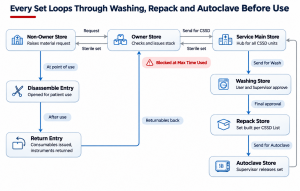
CSSD cycle in AdeaHub: 9 locations and entries, one usage gate
A non-owner store requests a set; the owner store issues sterile stock or sends unsterile stock to the Service Main Store. Each unit’s approval posts the next stock entry automatically, and an instrument at its Max Time Used cannot re-enter the loop.
Key features
Feature | How it works |
CSSD Material Request | One request screen for owner-to-service-location, non-owner-to-owner and non-owner-to-non-owner requests; status moves Draft → Pending → Transferred |
Washing Master | Pick the washing unit (type, location and temperature auto-fetch), pull items from the transfer stock entry, assign serial numbers per line, then Send for Wash |
Two-step approval | Washing User approves the wash, Washing Supervisor sets the repack location and gives final approval; Autoclave follows the same pattern |
Auto stock entries | Each workflow action posts its own transfer: Main Store → Washing → Repack, and Autoclave → Main Store, with no manual entry |
Repack from CSSD List | “Get CSSD Items” pulls a set’s contents from the CSSD List and repacks them into one parent item, one set at a time |
Disassemble | At the point of use, a non-owner store breaks the set back into its instruments from the latest transfer entry |
Return split | One Return button creates two entries: Material Issue for consumables and Material Transfer for returnable instruments |
Usability limit | Times Used on Each Serial No goes up after every sterilization; at max time used, the system blocks transfer back for washing. |
Example from testing: Volkmann Scoop SN-03426 reached its usage limit after one cycle, and the system refused to send it back to the Service Location Main Store.
Implementation approach and roles
We started from an As-Is study of the four processes, mapped each handover to a standard ERPNext transaction, and built custom doctypes only where the standard ones fell short (washing, autoclave, CSSD List, usage limits). A step-by-step user manual covering 12 master’s and the full transaction cycle was written for go-live.
Access is split by role, so each team sees only its own step:
Role | Responsibility |
Non-Owner Store User | Raises CSSD Material Requests, disassembles sets for patient use, returns used sets |
CSSD Owner Store User | Fulfils requests, sends unsterile stock to the Service Location, requests sterile stock |
Washing User | Creates the Washing Master, sends items for wash, and confirms wash is done. |
Washing Supervisor | Sets the repack location and gives final washing approval |
Repack User | Builds sets from the CSSD List through repack stock entries |
Autoclave User | Creates the Autoclave Master, sends sets for sterilization, picks the return store |
Autoclave Supervisor | Approves sterilization and releases sets back to the Main Store. |
Outcomes
Stock traceability rose from 40–50% before the implementation to 100% after it. Dedalus can now identify and trace each stock item by its batch and serial number and see its current location and sterilization stage. They can also analyze each item’s usability: how many times it has been used, so it can be scrapped once it reaches its limit.
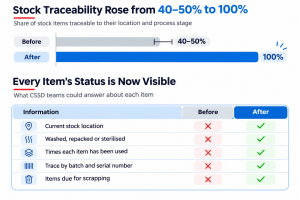
Client figures shared by the project team · before and after go-live
Before (As-Is) | After (AdeaHub on ERPNext) |
Sets tracked as item groups in bin locations | Every instrument tracked by serial number on the stock ledger; traceability 100% (was 40–50%) |
Sterilization order set by configuration, not enforced | Washing, repacking, and autoclaving run as approved workflow steps with auto stock entries. |
Manual acknowledgement at each handover | Submitted transfers act as the acknowledgement; material request status updates itself |
“Waiting for stock” with no visibility | Owner store sees stock by location and requests sterile stock or sends stock for processing |
No limit on instrument reuse | Max Time Used blocks an instrument once its limit is reached and flags it for scrapping |
| Consumables and returnables handled together | One click splits a return into Material Issue and Material Transfer. |
Open question: post-go-live figures (turnaround time per set, number of stores live, sets processed per day) are not in the source documents and should be added before the case study is shared externally.
Lessons learned and next steps
- Model locations as warehouses. Treating each washing, repack, and autoclave unit as a warehouse turned every CSSD step into a ledger entry and gave traceability almost for free.
- Load serial numbers on day one. Serial-tracked opening stock through stock reconciliation was the precondition for every later control, including the usage limit.
- Let the workflow post the stock entry. Auto-created transfers on approval removed manual entry and kept stock in step with the physical process.
- Repack one set at a time. Repacking one quantity per entry kept serial assignment clean, at the cost of more entries for high-volume sets.
Conclusion
The AdeaHub CSSD implementation demonstrates how ERPNext can bring better control and visibility to hospital sterilization operations.
By connecting instrument tracking, stock movements, washing, repacking, and autoclaving through structured workflows, we helped Dedalus move away from manual requests and acknowledgements to a more organized process.
With serial number-level tracking, stock traceability increased from 40–50% to 100%. Teams can now identify each instrument’s current location, sterilization stage, and usage history. The system also prevents instruments from re-entering the sterilization cycle once they reach their configured usage limit.
With ERPNext, Dedalus now has a connected CSSD process that tracks every instrument from the owner store to patient use and back, while maintaining a clear record of each stage.
Connect with Indictrans to explore how ERPNext can help bring better visibility and control to your operations.